快速完成聊天室核心功能
学习和使用springBoot框架下的websocket,完成聊天室的核心功能
通过阅读文档,配合官方demo,快速的学习和使用websocket技术
服务端 基础版
springBoot WebSocket
Maven依赖
xml
 <!--WebSocket-->
        <dependency>
            <groupId>org.springframework.boot</groupId>
            <artifactId>spring-boot-starter-websocket</artifactId>
        </dependency>
配置类
java
package cn.shirtiny.community.SHcommunity.Config;

import org.springframework.context.annotation.Configuration;
import org.springframework.messaging.simp.config.MessageBrokerRegistry;
import org.springframework.web.socket.config.annotation.EnableWebSocketMessageBroker;
import org.springframework.web.socket.config.annotation.StompEndpointRegistry;
import org.springframework.web.socket.config.annotation.WebSocketMessageBrokerConfigurer;

@Configuration
//消息订阅器
@EnableWebSocketMessageBroker
public class WebSocketConfig implements WebSocketMessageBrokerConfigurer {

    @Override
    public void registerStompEndpoints(StompEndpointRegistry registry) {
        //添加服务端接口 终端点 js连接: let socket=new SockJS('/websocket');
        registry.addEndpoint("/websocket").withSockJS();
    }

    @Override
    public void configureMessageBroker(MessageBrokerRegistry registry) {
        //允许客户端订阅主题/room
        registry.enableSimpleBroker("/room");
        //注册 app的前缀/app
        registry.setApplicationDestinationPrefixes("/app");
    }
}
Endpoint为客户端连接服务端websocket服务,服务端通过SimpleBroker控制客户端的订阅的主题、频道,客户端发送消息时,需要带ApplicationDestinationPrefixes中的前缀。
Controller
java
@Controller
public class WebSocketController {

    //接收消息的接口路径,聊天室频道
    @MessageMapping("/sendToRoom")
    //发送到 /room/chat 频道
    @SendTo("/room/chat")
    public ShResultDTO<String,Object> retString(@RequestBody ChatMessageDTO message )  {

        return new ShResultDTO<>();
    }
-
@MessageMapping("/sendToRoom"),使用上类似于@RequestMapping,不过客户端发送消息时,需要带上ApplicationDestinationPrefixe前缀,如:/app/sendToRoom,使用的为ws协议,完整的写法为:ws://ip:port/app/sendToRoom。 -
@SendTo("/room/chat")会把返回结果广播到/room/chat频道
客户端 基础版
sockjs-client + stomp-websocket
Maven依赖
xml
<dependency>
            <groupId>org.webjars</groupId>
            <artifactId>sockjs-client</artifactId>
            <version>1.0.2</version>
        </dependency>
        <dependency>
            <groupId>org.webjars</groupId>
            <artifactId>stomp-websocket</artifactId>
            <version>2.3.3</version>
        </dependency>
springBoot可以用这种方式使用静态资源,前端页面引入方式:
html
<script src="/webjars/sockjs-client/sockjs.min.js"></script>
<script src="/webjars/stomp-websocket/stomp.min.js"></script>
建立连接
js
//连接socket
                connect: function () {
                    //建立socket连接
                    let socket = new SockJS('/websocket');
                    stompClient = Stomp.over(socket);
                    //连接socket
                    stompClient.connect({}, function (frame) {
                        console.log("连接socket: /websocket");
                        console.log(frame);
                    });
                },
断开连接
js
//断开socket连接
                disconnect: function () {
                    console.log(this.isConnected);
                    if (stompClient !== null && this.isConnected === true) {
                        stompClient.disconnect(() => {
                            console.log("断开socket连接");
                        });
                        this.$notify.success({
                            title: '√',
                            message: '已断开连接'
                        });
                    }
                },
订阅频道
每次订阅都将生成一个客户端id,订阅后会持续接收服务端的广播,每次接收都会更新响应数据
js
//订阅频道
                subscribeChatRoom: function () {
                    //订阅 /room/chat 频道,每次订阅频道广播数据时都会执行回调方法
                    this.chatSubscribe = stompClient.subscribe('/room/chat', retData => {
                        // console.log("频道: /room/chat,响应数据为:");
                        // console.log(retData);
                        //存储订阅频道发过来的数据
                        let res = JSON.parse(retData.body);
                        console.log("你订阅的频道更新啦!!!!!~");
                    });
                    console.log("订阅频道,接收到的对象:");
                    console.log(this.chatSubscribe);
                },
取消订阅
取消订阅需要使用之前此订阅对象的unsubscribe()方法
js
//取消订阅聊天室频道
                unsubscribeChat: function () {
                    this.chatSubscribe.unsubscribe();
                    console.log("取消订阅");
                },
发送消息
需要带有指定前缀,header可以为空
js
   //发送消息
                sendMessage: function () {
                        stompClient.send("/app/sendToRoom", {}, "message");
                },
案例
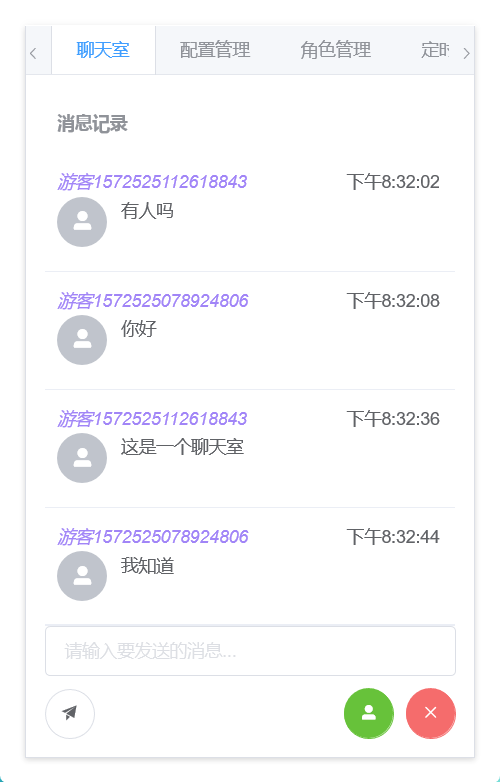
我以我社区的聊天室为例,前端样式上使用了elmentUI的表格,然后进行了自定义:
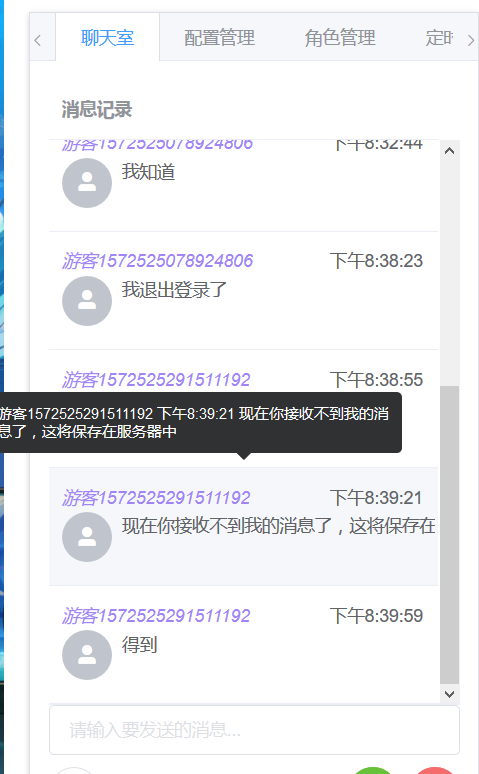
目前仍在完善中。
前端Vue+Element
html
<!DOCTYPE html>
<html lang="en" xmlns:th="http://www.thymeleaf.org">
<script src="/webjars/sockjs-client/sockjs.min.js"></script>
<script src="/webjars/stomp-websocket/stomp.min.js"></script>

<el-row id="vue_el_tab" th:fragment="el_tab" class="img-rounded">
    <el-tabs v-model="activeName" @tab-click="clickTab" type="border-card">

        <el-tab-pane label="聊天室" name="first">
            <el-row style="height: 400px">
                <el-col :span="24">
                    <el-table
                            :data="historyMessages"
                            style="width: 100%"
                            max-height="500"
                            id="messageTable"
                    >
                        <!--暂时只支持游客-->
                        <el-table-column
                                label="消息记录 "
                                min-width="280"
                                show-overflow-tooltip>

                            <div slot-scope="scope">
                                <el-row id="message_header">
                                    <span v-if="scope.row.sender!=null" style="font-style: italic;color: #a185f7">{{scope.row.sender.nickName}}</span>
                                    <span v-else-if="scope.row.sender==null" style="font-style: italic;color: #a185f7">游客{{scope.row.senderId}}</span>
                                    <span class="float_right">{{fomateDate(scope.row.gmtCreated)}}</span>
                                </el-row>

                                <el-row id="message_content">
                                    <el-col :span="4">
                                        <el-avatar icon="el-icon-user-solid"></el-avatar>
                                    </el-col>

                                    <el-col :span="20">
                                        <div style="display: block;">{{scope.row.chatMessageContent}}</div>
                                    </el-col>
                                </el-row>
                            </div>

                        </el-table-column>
                    </el-table>
                </el-col>
            </el-row>
            <el-row>
                <el-col :span="24">
                    <el-input
                            placeholder="请输入要发送的消息..."
                            v-model="unsendChatMessage"
                            clearable>
                    </el-input>
                    <p></p>
                </el-col>
            </el-row>
            <el-row>
                <el-col :span="24">
                    <el-tooltip content="发送" placement="bottom" effect="light">
                        <el-button icon="el-icon-s-promotion" @click="sendMessage" circle></el-button>
                    </el-tooltip>

                    <el-tooltip content="登出" placement="bottom" effect="light">
                        <el-button id="unSubBtn" icon="el-icon-close" type="danger" class="float_right"
                                   @click="unsubscribeChat"
                                   circle></el-button>
                    </el-tooltip>
                    <el-tooltip content="登入" placement="bottom" effect="light">
                        <el-button id="subBtn" icon="el-icon-user-solid" type="success" class="float_right"
                                   @click="subscribeChatRoom"
                                   circle></el-button>
                    </el-tooltip>
                </el-col>
            </el-row>
        </el-tab-pane>

        <el-tab-pane label="配置管理" name="second">配置管理</el-tab-pane>
        <el-tab-pane label="角色管理" name="third">角色管理</el-tab-pane>
        <el-tab-pane label="定时任务补偿" name="fourth">定时任务补偿</el-tab-pane>
    </el-tabs>
    </div>
    <style>
        #vue_el_tab {
            background-color: #fff;
            padding: 20px 20px 20px 20px;
            width: 400px;
        }
    </style>
    <script>
        const vue_el_tab = new Vue({
            el: "#vue_el_tab",
            data() {
                return {
                    activeName: 'second',
                    //聊天室正在输入的消息
                    unsendChatMessage: '',
                    //聊天室历史消息
                    historyMessages: [],
                    //聊天室订阅的对象 为空时为不订阅状态
                    chatSubscribe: null,
                    //游客id
                    touristID: '',
                    //聊天室每个消息单元格的高度
                    cellHeight: 94,
                    //标识是否让滚动条 自动跟进新消息
                    letScollAtFoot: true,
                };
            },
            computed: {
                //游客用户名
                touristName: function () {
                    return '游客' + this.touristID
                }
            },
            methods: {
                //切换tab时触发
                clickTab(tab, event) {
                    console.log("点击tab");
                    console.log(tab.index);
                    if (tab.index == 0) {
                        //订阅聊天室
                        this.subscribeChatRoom();
                    }
                },
                //加载聊天室历史数据
                loadChatHistoryDta() {
                    axios.get('/shApi/listChatRoomMessages').then(res => {
                        this.historyMessages = res.data.data.historyMessages;
                        console.log(this.historyMessages);
                    })
                },
                //订阅频道
                subscribeChatRoom: function () {
                    //已订阅聊天室则不再订阅
                    if (this.chatSubscribe != null) {
                        return;
                    }
                    //订阅 /room/chat 频道,每次订阅频道广播数据时都会执行回调方法
                    this.chatSubscribe = stompClient.subscribe('/room/chat', retData => {
                        // console.log("频道: /room/chat,响应数据为:");
                        // console.log(retData);
                        //存储订阅频道发过来的数据
                        let res = JSON.parse(retData.body);
                        //更新历史消息
                        this.historyMessages = res.data.historyMessages;
                        console.log("你订阅的频道更新啦!!!!!~");
                    }, {id: 'client1'});
                    console.log("订阅频道,接收到的对象:");
                    console.log(this.chatSubscribe);

                    //订阅,加载聊天室历史数据
                    this.loadChatHistoryDta();

                    //提示
                    this.$notify.success({
                        title: '√',
                        message: '已订阅聊天室'
                    });
                },
                //取消订阅聊天室频道
                unsubscribeChat: function () {
                    if (this.chatSubscribe == null) {
                        this.$notify.info({
                            title: '消息',
                            message: '已经退出聊天室了'
                        });
                        return;
                    }
                    this.chatSubscribe.unsubscribe();
                    console.log("取消订阅");
                    //把聊天室订阅对象置为null
                    this.chatSubscribe = null;
                    this.$notify.info({
                        title: '消息',
                        message: '已退出聊天室'
                    });

                },
                //发送消息
                sendMessage: function () {
                    //在已订阅时,才发送和清空输入框
                    if (this.chatSubscribe != null) {
                        stompClient.send("/app/sendToRoom", {}, JSON.stringify({
                            chatMessageContent: this.unsendChatMessage,
                            senderId: Number(this.touristID)
                        }));
                        //清空输入框
                        this.unsendChatMessage = '';
                    }
                },
                //连接socket
                connect: function () {
                    //建立socket连接
                    let socket = new SockJS('/websocket');
                    stompClient = Stomp.over(socket);
                    //连接socket
                    stompClient.connect({}, function (frame) {
                        console.log("连接socket: /websocket");
                        console.log(frame);
                    });
                },
                //断开socket连接
                disconnect: function () {
                    console.log(this.isConnected);
                    if (stompClient !== null && this.isConnected === true) {
                        stompClient.disconnect(() => {
                            console.log("断开socket连接");
                        });
                        this.$notify.success({
                            title: '√',
                            message: '已断开连接'
                        });
                    }
                },
                //随机生成一个游客id,从后台获取数据
                getTouristID() {
                    axios.get('/shApi/newChatRoomSenderId').then(res => {
                        console.log("获取游客id");
                        console.log(res);
                        this.touristID = res.data.data.touristID;
                    })
                },
                //日期格式化
                fomateDate: function (dateStr) {
                    var date = Number(dateStr);
                    date = new Date(date).toLocaleString();
                    return date.split(" ")[1];
                },
                //判断滚动条是否在底部
                scrollAtFoot: function () {
                    let elTable = $(`#messageTable .el-table__body-wrapper`)[0];
                    let clientHeight = elTable.clientHeight;
                    let scrollHeight = elTable.scrollHeight;
                    let scrollTop = $('#messageTable .el-table__body-wrapper').scrollTop();
                    console.log("clientHeight的值为:" + clientHeight + ";scrollHeight为" + scrollHeight + ";scrollTop为" + scrollTop);
                    //当滚动条在底部时
                    if (scrollHeight - scrollTop === clientHeight) {
                        return true
                    }
                },
                //移动滚动条到底部
                moveScroll: function () {
                    //注意,需要在数据更新完成,并且页面渲染完成后才做这件事
                    $('#messageTable .el-table__body-wrapper').scrollTop((this.historyMessages.length) * this.cellHeight);
                }
            },
            //vue创建后
            created: function () {
                //连接socket
                this.connect();
                //获取游客id
                this.getTouristID()
            },
            updated: function () {
                //如果订阅了频道,并且打开了滚动条跟进
                if (this.chatSubscribe != null && this.letScollAtFoot === true) {
                    // 把滚条移动到最底部
                    this.moveScroll();
                }
            }
        })
    </script>
</html>
在聊天室业务中,我们需要在新消息收到后,将滚动条下拉,以便显示新消息。如果使用传统或自定义的组件,这个没有任何问题。
注意,需要在页面渲染完成后再操作滚动条
这里我选用了el-table组件,但其并未对此有相关说明。这里我只能选中el-table的元素进行dom操作:
js
//选中el-table的滚动条元素
let elTable = $(`#messageTable .el-table__body-wrapper`);
js
 //判断滚动条是否在底部
                scrollAtFoot: function () {
                    let elTable = $(`#messageTable .el-table__body-wrapper`)[0];
                    let clientHeight = elTable.clientHeight;
                    let scrollHeight = elTable.scrollHeight;
                    let scrollTop = $('#messageTable .el-table__body-wrapper').scrollTop();
                    console.log("clientHeight的值为:" + clientHeight + ";scrollHeight为" + scrollHeight + ";scrollTop为" + scrollTop);
                    //当滚动条在底部时
                    if (scrollHeight - scrollTop === clientHeight) {
                        return true
                    }
                },
//移动滚动条到底部
                moveScroll: function () {
                    //注意,需要在数据更新完成,并且页面渲染完成后才做这件事
                    $('#messageTable .el-table__body-wrapper').scrollTop((this.historyMessages.length) * this.cellHeight);
                }
后端springBoot
仍在完善中。
java
package cn.shirtiny.community.SHcommunity.Controller;

import ...

@Controller
public class WebSocketController {

    @Autowired
    private IchatHistoryService chatHistoryService;

    @Autowired
    private IchatMessageService chatMessageService;


    //接收消息的接口路径,聊天室频道
    @MessageMapping("/sendToRoom")
    //发送到 /room/chat 频道
    @SendTo("/room/chat")
    public ShResultDTO<String,Object> retString(@RequestBody ChatMessageDTO message )  {


        //聊天室记录的固定id
        Long historyId=0L;
        //发送者id 游客模式
        senderId=message.getSenderId();

        //接收者id
        //暂无
        //将消息存入数据库
        chatMessageService.addChatMessage(message.getChatMessageContent(), historyId, senderId, null);

        //从数据库中查询此聊天室的消息,广播给该频道
        return tolistChatRoomMessages();
    }

    //创建聊天室的聊天记录表
    @PostMapping(value = "/shApi/createChatRoomTable")
    @ResponseBody
    public ShResultDTO<String,Object> toCreateChatRoomTable(){
        ChatHistory chatHistory=new ChatHistory();
        chatHistory.setChatHistoryId(0L);
        chatHistory.setChatHistoryName("shChatRoom");
        chatHistory.setGmtCreated(System.currentTimeMillis());
        chatHistory.setGmtModified(chatHistory.getGmtCreated());
        boolean flag = chatHistoryService.addOneChatHistory(chatHistory);

        return flag ? new ShResultDTO<>(200,"聊天室创建成功") : new ShResultDTO<>(501,"聊天室创建失败,该聊天室已存在");
    }

    //查询聊天室的聊天记录
    @GetMapping(value = "/shApi/listChatRoomMessages")
    @ResponseBody
    public ShResultDTO<String,Object> tolistChatRoomMessages(){

        List<ChatMessageDTO> chatMessageDTOs = chatMessageService.selectMessagesByHistoryId(0L);
        Map<String,Object> map=new HashMap<>();
        map.put("historyMessages",chatMessageDTOs);

        return new ShResultDTO<>(200,"聊天室记录查询完成",map,null);
    }

    //清空聊天室的聊天记录
    @GetMapping(value = "/shApi/cleanChatRoomMessages")
    @ResponseBody
    public ShResultDTO<String,Object> toCleanChatRoomMessages(){

        chatMessageService.deleteMessagesByhistoryId(0L);

        return new ShResultDTO<>(200,"聊天室记录已清空");
    }

    //生成一个聊天室游客id
    @GetMapping(value = "/shApi/newChatRoomSenderId")
    @ResponseBody
    public ShResultDTO<String,Object> toNewChatRoomTouristId(HttpServletRequest request){
        Map<String,Object> map=new HashMap<>();

        Random random=new Random();
        int touristIDNumber= random.nextInt(999);
        //转成字符串,加上时间戳
        String touristID=""+System.currentTimeMillis()+touristIDNumber;
        System.out.println("生成的游客id为:"+touristID);
        map.put("touristID",touristID);
        //存入session
        request.getSession().setAttribute("touristID",touristID);
        return new ShResultDTO<>(200,"生成一个游客id",map,null);
    }
}
表结构
ChatHistory
java
package cn.shirtiny.community.SHcommunity.Model;

import com.baomidou.mybatisplus.annotation.*;
import lombok.Data;

//聊天记录、频道
@Data
@TableName("chat_history")
public class ChatHistory {
    //主键
    @TableId(value = "chat_history_id",type = IdType.AUTO)
    Long chatHistoryId;
    //聊天记录的名称,唯一
    @TableField(value = "chat_history_name",insertStrategy = FieldStrategy.NOT_EMPTY)
    String chatHistoryName;
    //聊天创建时间
    @TableField(value = "gmt_created",insertStrategy = FieldStrategy.NOT_NULL)
    Long gmtCreated;
    //更新时间
    @TableField(value = "gmt_modified",insertStrategy = FieldStrategy.NOT_NULL)
    Long gmtModified;
    //消息条数
    @TableField(value = "message_num",insertStrategy = FieldStrategy.DEFAULT)
    Long messageNum;
}
ChatMessage
java
package cn.shirtiny.community.SHcommunity.Model;

import com.baomidou.mybatisplus.annotation.*;
import lombok.Data;

//聊天消息
@Data
@TableName("chat_message")
public class ChatMessage {
    //主键
    @TableId(value = "chat_message_id",type = IdType.AUTO)
    Long chatMessageId;
    //记录此消息的 聊天记录的id
    @TableField(value = "chat_history_id",insertStrategy = FieldStrategy.NOT_NULL)
    Long chatHistoryId;
    //消息内容
    @TableField(value = "chat_message_content",insertStrategy = FieldStrategy.NOT_EMPTY)
    String chatMessageContent;
    //创建时间
    @TableField(value = "gmt_created",insertStrategy = FieldStrategy.NOT_NULL)
    Long gmtCreated;
    //发送者id,可以为空
    @TableField(value = "sender_id")
    Long senderId;
    //接收者id,可以为空
    @TableField(value = "recipient_id")
    Long recipientId;
}
DTO对象
java
package cn.shirtiny.community.SHcommunity.DTO;

import cn.shirtiny.community.SHcommunity.Model.ChatMessage;
import lombok.Data;

import java.util.List;
@Data
public class ChatHistoryDTO {
    //主键
    Long chatHistoryId;
    //聊天记录的名称
    String chatHistoryName;
    //聊天创建时间
    Long gmtCreated;
    //更新时间
    Long gmtModified;
    //消息条数
    Long messageNum;
    //记录的消息列表,不在数据库中
    List<ChatMessage> chatMessages;
}
java
package cn.shirtiny.community.SHcommunity.DTO;

import lombok.Data;

@Data
public class ChatMessageDTO {
    //主键
    Long chatMessageId;
    //记录此消息的 聊天记录的id
    Long chatHistoryId;
    //消息内容
    String chatMessageContent;
    //创建时间
    Long gmtCreated;
    //发送者id
    Long senderId;
    //接收者id
    Long recipientId;

    //发送者
    UserDTO sender;
    //接收者
    UserDTO recipient;
}